Agile teams are designed to change software quickly. That is valuable, but every change creates a question: did we unintentionally break something that already worked?
Regression testing answers that question. A regression test repeats an important user journey after the product changes. It might sign in, enter a workout, save a weight measurement, record a meal, reload the application, and confirm that the new data appears in history and charts. Playwright automates those browser journeys using the same controls a person uses.
This is not merely a developer concern. A product manager decides which user outcomes matter, which risks could delay a release, and what evidence is good enough to ship. Understanding regression tests helps the product manager turn those decisions into a reusable product safety net.
Why regression testing matters when the product changes quickly
A feature rarely lives alone. A change to authentication can affect every page. A redesigned form can stop an existing test from finding its Save button. A database or API change can allow entry to appear successful but fail to load the record after refresh. A chart can still be visible while silently omitting the newest value.
Manual testing can find these problems, but repeating the same checklist before every release consumes time and attention. It is also inconsistent: people skip steps, interpret results differently, and understandably focus on the new feature rather than old behavior.
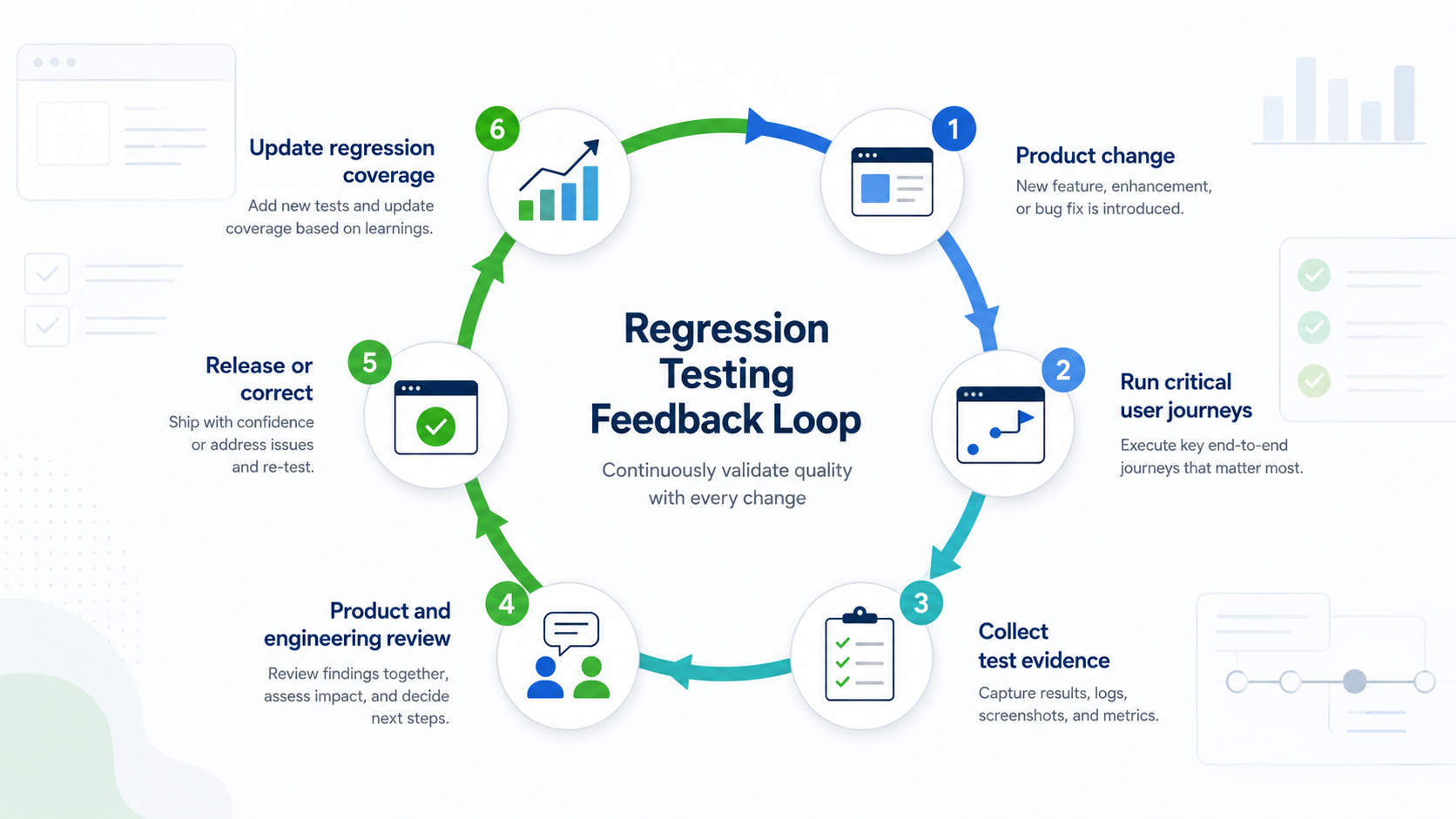
Regression testing turns every product change into evidence, a release decision, and better coverage for the next change.
An automated regression suite gives the team repeatable evidence:
- The same important journeys run after every meaningful change.
- Failures are found closer to the change that caused them.
- A test records the exact action and assertion that failed.
- People spend less time repeating routine checks and more time exploring new behavior, unusual cases, and customer experience.
Automation does not replace exploratory testing or product judgment. It protects stable, understood behavior so human attention can go where it has the most value.
Why a product manager should understand the tests
The best regression suite is a map of product risk, not a count of test files. A product manager does not need to become a test engineer, but should be able to answer five questions:
- Which customer journeys would cause the most harm if they stopped working?
- Which roles, browsers, devices, and data conditions matter?
- What result proves that a journey really succeeded?
- Which tests are safe to run repeatedly, and which create real data or trigger external services?
- Which failures block a release, and who owns the decision?
For example, clicking Save measurement is not enough evidence that body tracking works. A stronger scope confirms that the request succeeded, reloads the page, finds the saved value again, and verifies that the chart received the new measurement. That distinction—testing an action versus testing the user outcome—is where product management adds enormous value.
The simplest Playwright setup in VS Code
You need the current Node.js LTS release and Visual Studio Code.
- Open the project folder in VS Code.
- Open Extensions with
Ctrl+Shift+Xon Windows orCmd+Shift+Xon macOS. - Search for Playwright Test for VS Code and install the official Microsoft extension.
- Open the Command Palette with
Ctrl+Shift+PorCmd+Shift+P. - Run Test: Install Playwright and accept the suggested defaults.
Microsoft's extension can initialize the project, install browser support, and add an example test. The Testing sidebar then lets you run and debug tests without memorizing commands. The official Playwright VS Code guide walks through the same setup.
If you prefer the terminal, open a new project folder and run:
npm init playwright@latest
Choose TypeScript when prompted. Playwright creates a configuration file, an example test, and an optional GitHub Actions workflow. See the official Playwright installation guide for the current options.
A basic test reads almost like a use case:
import { expect, test } from "@playwright/test";

test("a saved weight is available after reload", async ({ page }) => {
  await page.goto("https://example.com/body");
  await page.getByLabel("Weight").fill("199.3");
  await page.getByRole("button", { name: "Save measurement" }).click();
  await page.reload();
  await expect(page.getByText("199.3 lb")).toBeVisible();
});
Real tests should use a dedicated test environment or clearly identified test account. Tests that change production data must be intentional, documented, and safe to repeat.
Secure authentication without putting passwords in a test
Playwright can open a real browser for a person to complete the normal sign-in flow. After authentication, it can save the browser's authenticated storage state and reuse that state in later tests. The test starts signed in without hard-coding a password or trying to automate every multifactor prompt.
This is convenient, but it is important to describe it accurately: the saved
state is not harmless. It can contain cookies and tokens that may allow someone
to impersonate the test user. Playwright explicitly recommends saving it under
playwright/.auth/ and excluding that directory from source control. See the
official Playwright authentication guidance.
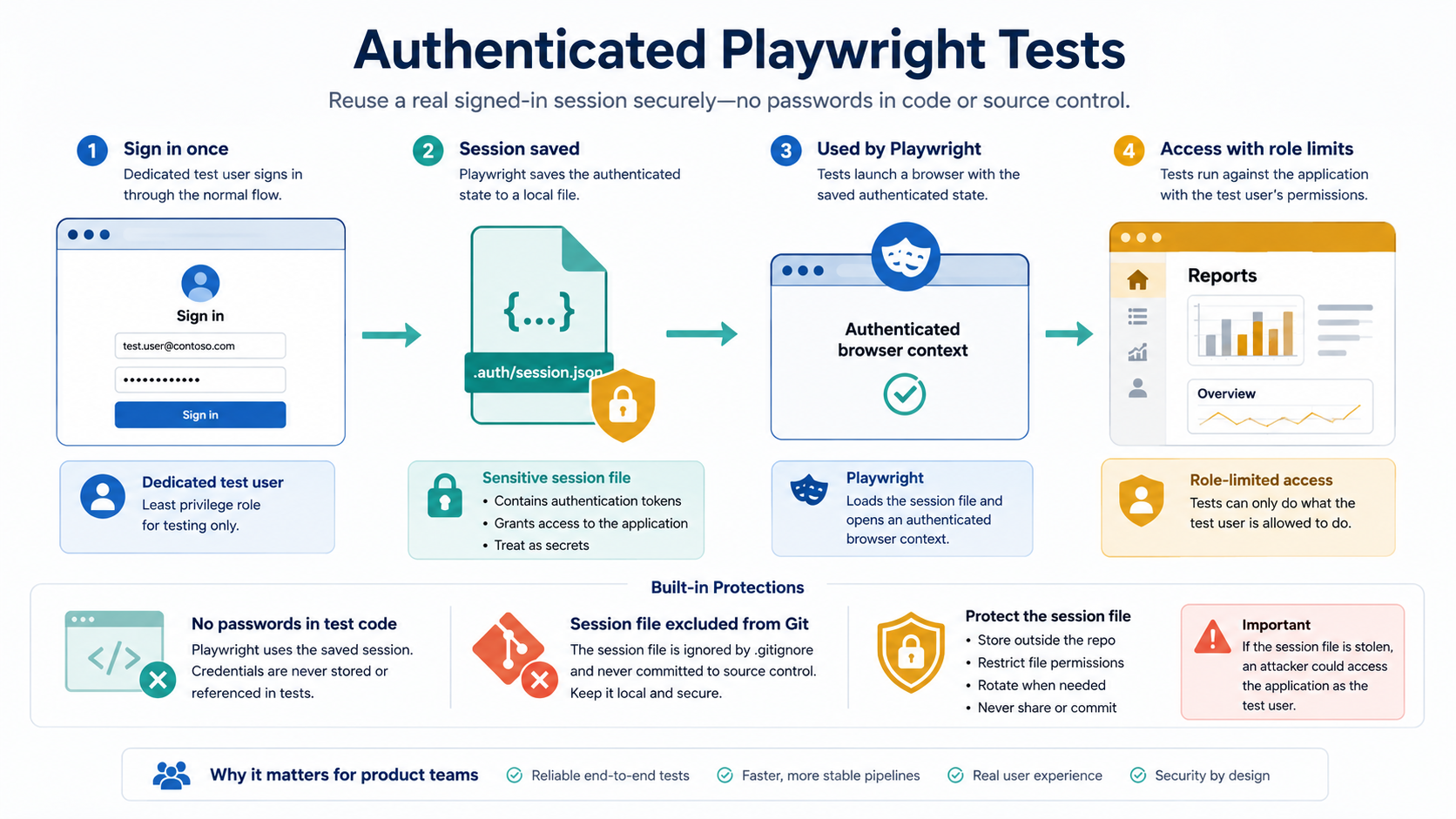
Playwright can reuse a signed-in session without placing a password in test code, but the resulting session file must be protected as a secret.
A sound local approach includes these controls:
- Use a dedicated test identity, not a product manager's personal account.
- Give the identity only the roles and permissions needed by the tests.
- Keep the authentication-state directory in
.gitignore. - Never paste the state file into chat, email, an issue, or a pull request.
- Refresh the state when the session expires and revoke it if exposure is suspected.
- Keep tests that modify shared data serial or give parallel tests separate accounts.
For automated pipelines, store credentials or certificates in an approved secret store and use short-lived access where possible. Microsoft recommends centralized identity, least privilege, and protected secrets for Azure-hosted applications. Its Playwright authentication overview also explains storage state, expiration, dedicated users, certificates, and Azure Key Vault patterns. The application's own authentication and authorization remain responsible for deciding what that test identity may do; Playwright does not bypass them.
How a product manager can review a test
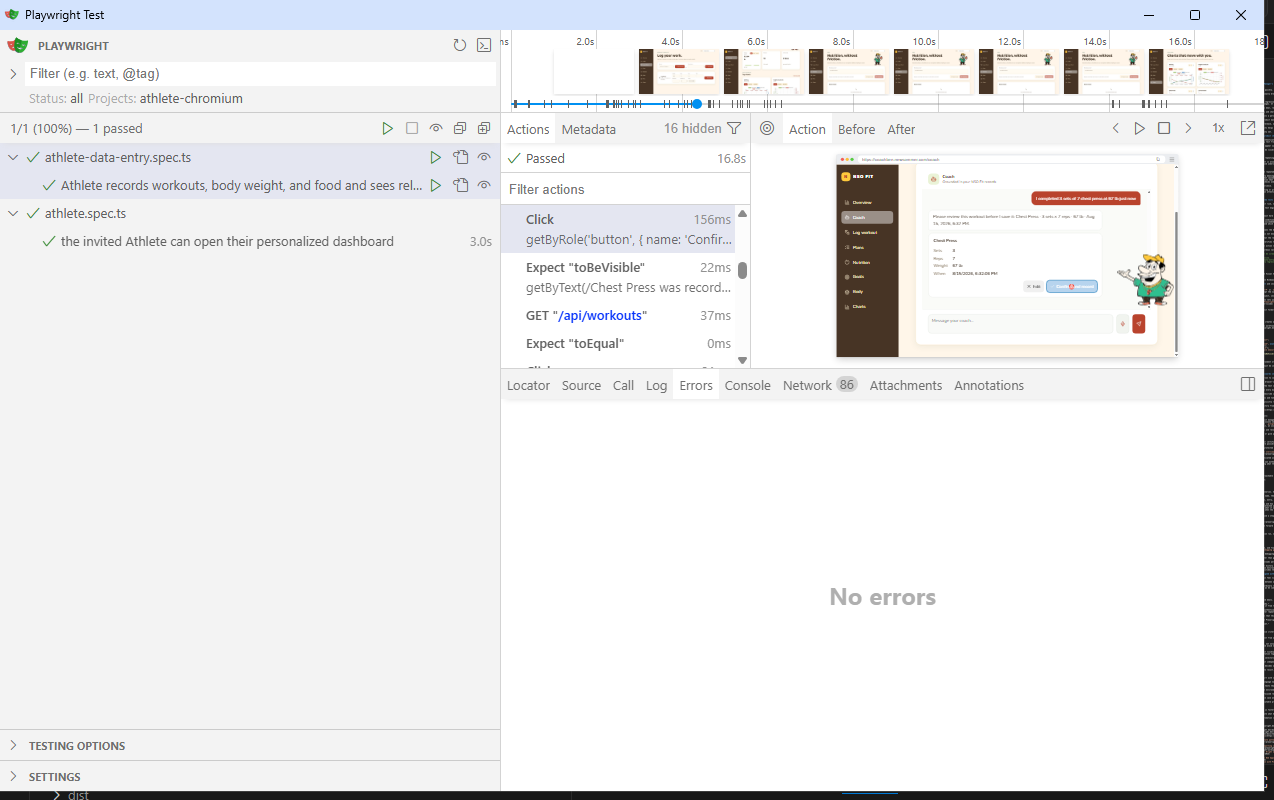
Playwright's UI Mode makes test results approachable without requiring someone to read the test source first. Start it with:
npx playwright test --ui
The left side lists test files and named scenarios. A product manager can run a single journey with the triangle beside its name, then review:
- Timeline — when each navigation, click, entry, and assertion occurred.
- Actions — the exact user-oriented step and how long it took.
- Before and After — the page around a selected action.
- Errors — what Playwright expected and what it actually found.
- Network and Console — useful evidence when the screen looks correct but an API or browser error occurred.
- Attachments and traces — screenshots and a step-by-step record of a failure.
The official UI Mode documentation shows how to run one test, move backward and forward through its actions, and inspect the page at the point of failure.
After a command-line or continuous-integration run, open the HTML report with:
npx playwright show-report
The report separates passed, failed, skipped, and flaky tests and provides details for each result. The running and debugging guide explains reports, headed runs, UI Mode, and debugging.
Product review should focus on outcomes rather than green check marks alone. Ask whether the test uses realistic data, reloads persisted records, checks the correct role, and proves meaningful chart or history updates. Also check whether a failure is a genuine regression, an environment outage, expired authentication, or a test that no longer describes the product.
Using AI to keep the regression scope aligned with the product
As a product grows, maintaining the suite can feel like maintaining another product. AI can reduce the translation work between a use case and test code. A product manager can describe a change in ordinary language, provide the existing test and relevant UI code, and ask an AI coding assistant to propose the smallest safe update.
Useful requests include:
- "The Nutrition page now supports snacks and meals. Identify the regression scenarios that should change and explain why."
- "Add a test that saves a workout, reloads it from the API, and confirms its chart is rendered. Preserve the existing authentication setup."
- "This locator matches four old records after repeated runs. Make the test repeatable without weakening the assertion that this run saved a new record."
- "Compare this release's use cases with the Playwright suite and list missing high-risk coverage. Do not edit anything yet."
A reliable AI-assisted workflow is:
- Give the assistant the use case, acceptance criteria, existing test, and relevant application code.
- Ask it to distinguish a changed requirement from a broken locator or test environment.
- Require assertions on persisted outcomes, not only button clicks.
- Ask it to preserve security boundaries and avoid exposing authentication state or secrets.
- Review the proposed scope and run the test visibly in UI Mode.
- Commit the test and its use-case documentation together.
AI is especially helpful at finding related selectors, API calls, and chart data flows across a repository. It should not independently redefine expected product behavior. The product manager still decides what matters, and the team still reviews generated code and observes the result.
A practical release habit
Keep the first suite small and valuable. Start with sign-in and three to five critical journeys. Give each test a plain-language name. Run fast, isolated tests on every pull request, and run slower tests that create real data on an intentional schedule or against a controlled environment.
When a defect reaches users, ask whether a focused regression test should be added. When a feature changes, update the use case and test in the same piece of work. Over time, the suite becomes both executable product documentation and a release safety net.
The payoff is not simply "more testing." It is faster, calmer product change: the team can see what still works, investigate what does not, and spend its limited human attention on the decisions automation cannot make.
Microsoft documentation and videos
- Playwright Test for VS Code
- Playwright installation
- Playwright authentication
- Playwright UI Mode
- Run, debug, and review Playwright reports
- Microsoft Learn: secure authentication-state patterns
- Microsoft Learn: Playwright Workspaces reporting in Azure
- Microsoft Learn video: Playing Your Tests Wright with VS Code
- Microsoft Developer video: Testing Modern Web Apps with Playwright
- Microsoft Developer video: Test automation with Playwright