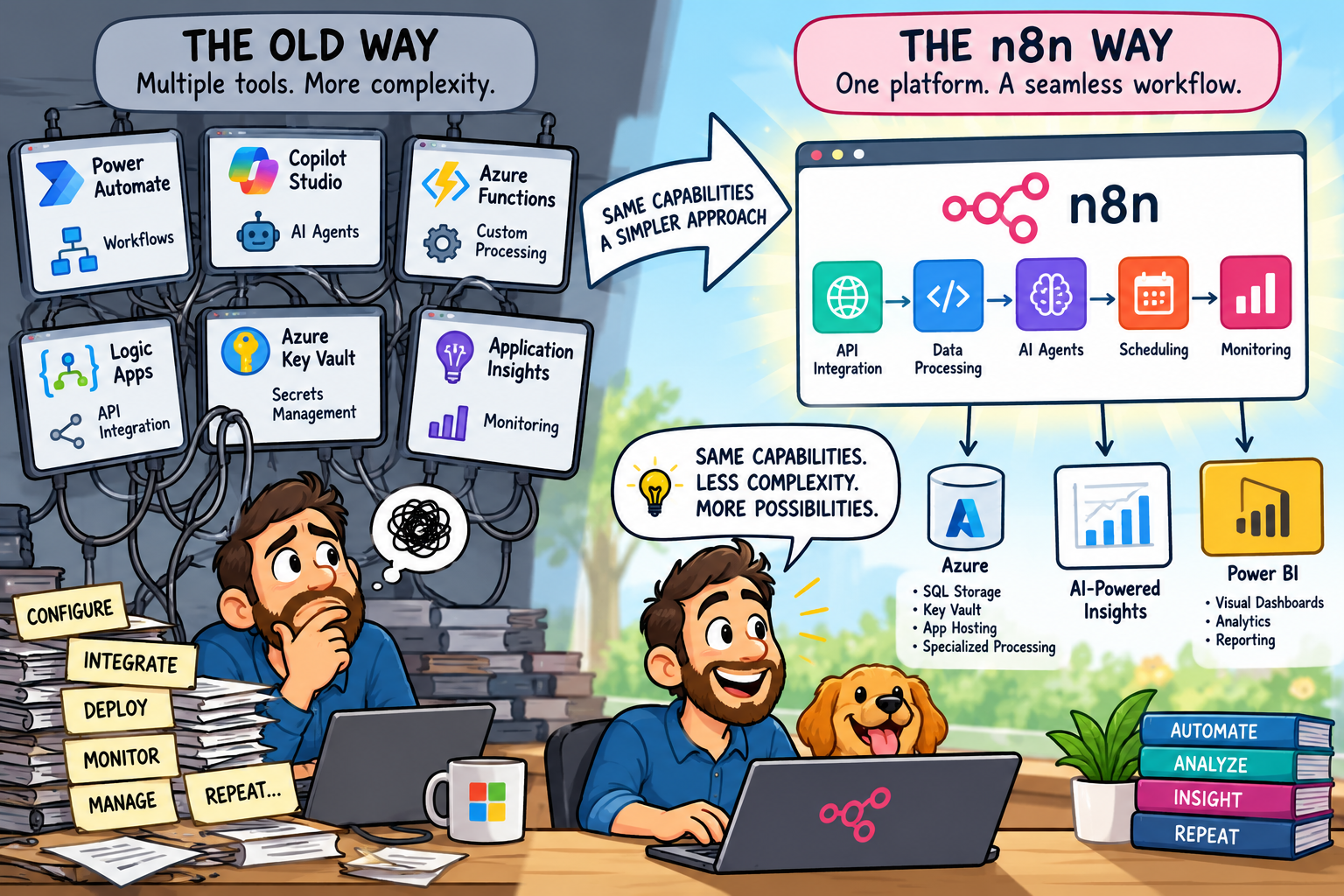
I have spent a considerable amount of time working with Microsoft's technology stack, particularly Azure, APIs, DevOps, Power Automate, and cloud-based integrations. I have built solutions using Azure Functions, SQL databases, REST APIs, and various automation tools.
Recently, I started experimenting with n8n Cloud, and I have to say, I am impressed.
Not necessarily because n8n does something Microsoft cannot do. In fact, Microsoft offers comparable capabilities across its ecosystem.
What impresses me is how seamlessly n8n brings everything together.
Workflow orchestration, API integration, data transformation, scheduling, and AI agents all operate within the same visual development environment. It got me thinking: have we made automation and AI development more complicated than they need to be?
The goal: describe the outcome, not build the plumbing
I gave myself a practical test. I wanted a tool that would:
- Pull football statistics for selected teams across the German Bundesliga, English Premier League, and Major League Soccer in the United States.
- Let me choose which teams I wanted to follow.
- Perform some basic analytics each week.
- Email the comparison to me automatically.
I did not want to write an application, create a database, or build storage just to prove the idea. Aside from supplying API credentials and authorizing the email connection, I wanted to describe the requirements and let the workflow do the work.
That is an intentionally demanding definition of “no code.” The workflow still contains logic, mappings, and configuration. But I did not have to start a software project, design a schema, deploy infrastructure, or maintain a custom service. For a proof of concept, that distinction matters.
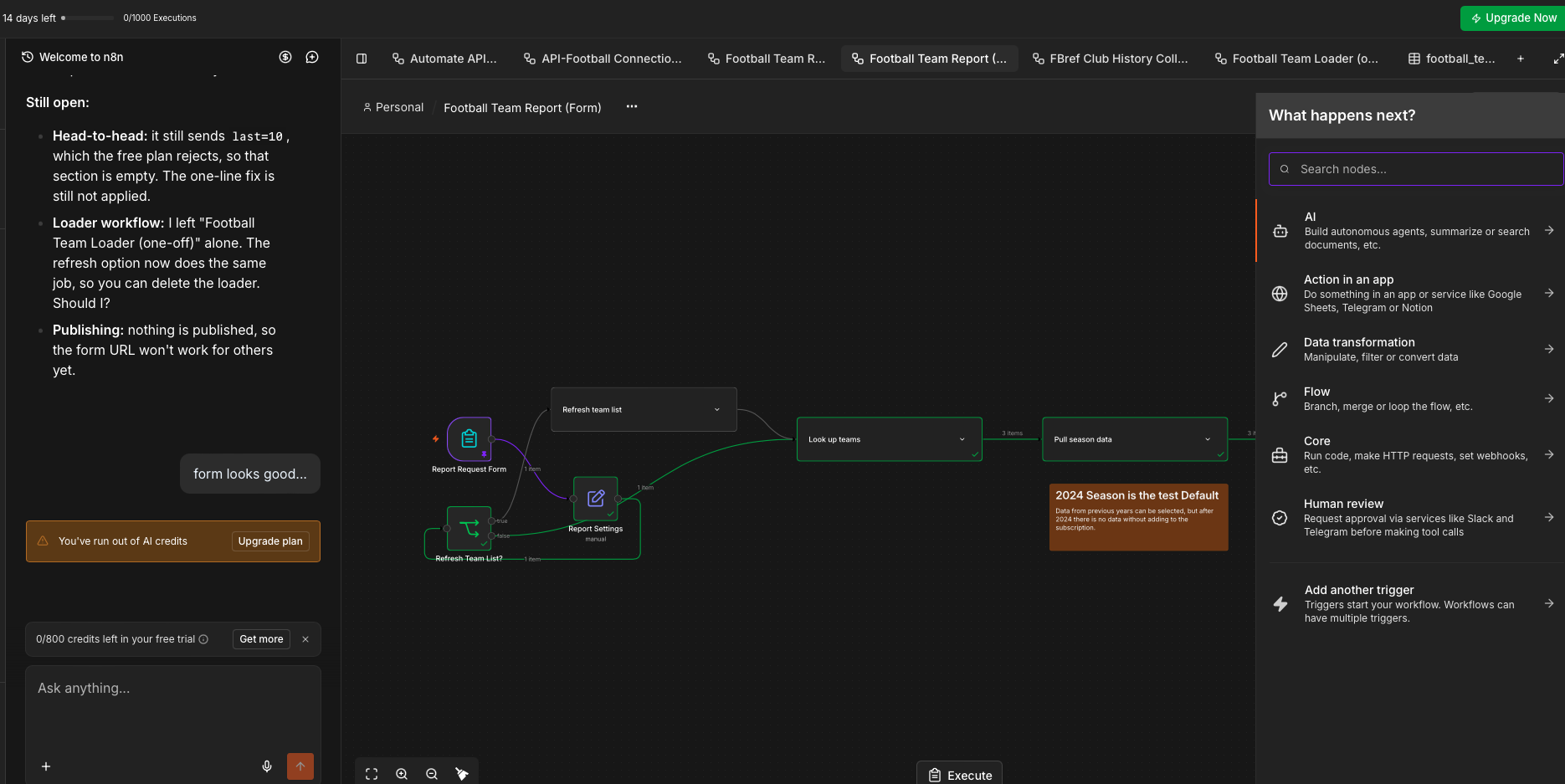
The proof of concept was built through the visual workflow and conversational development experience rather than as a separate application.
Building a current list of teams
I created an account with API-Football and received an API endpoint and key.
The first workflow built the list of teams in each competition. That list cannot simply be typed once and forgotten. Clubs can be promoted or relegated at the end of a season, so league membership is stable during a season but not permanently static.
The n8n workflow started with the three competitions, called the API for each one, flattened the responses into individual team records, and saved the resulting list for the next step. In my test, those three requests produced 68 team records.
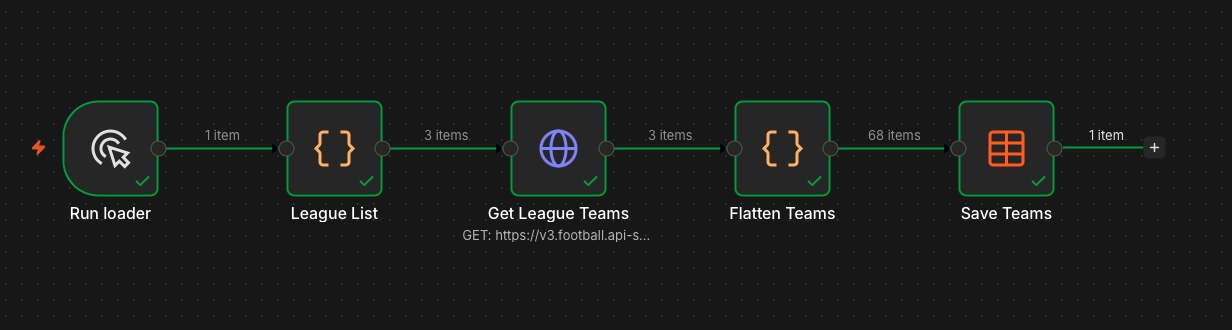
The loader retrieves all three leagues, flattens the API responses into 68 team records, and saves the current list for the report workflow.
What I liked about this stage was its visibility. I could see each part of the flow—the league list, API request, transformation, and saved table—and inspect the data passing between them. I was working on the outcome rather than assembling and deploying a small integration application.
Turning the team list into a simple form
I then asked n8n to create a basic web form using the current team list. The form gave me a simple way to choose the clubs I wanted the weekly report to follow.
For the proof of concept, I selected:
- Portland Timbers from MLS
- Liverpool from the Premier League
- Bayer Leverkusen from the Bundesliga
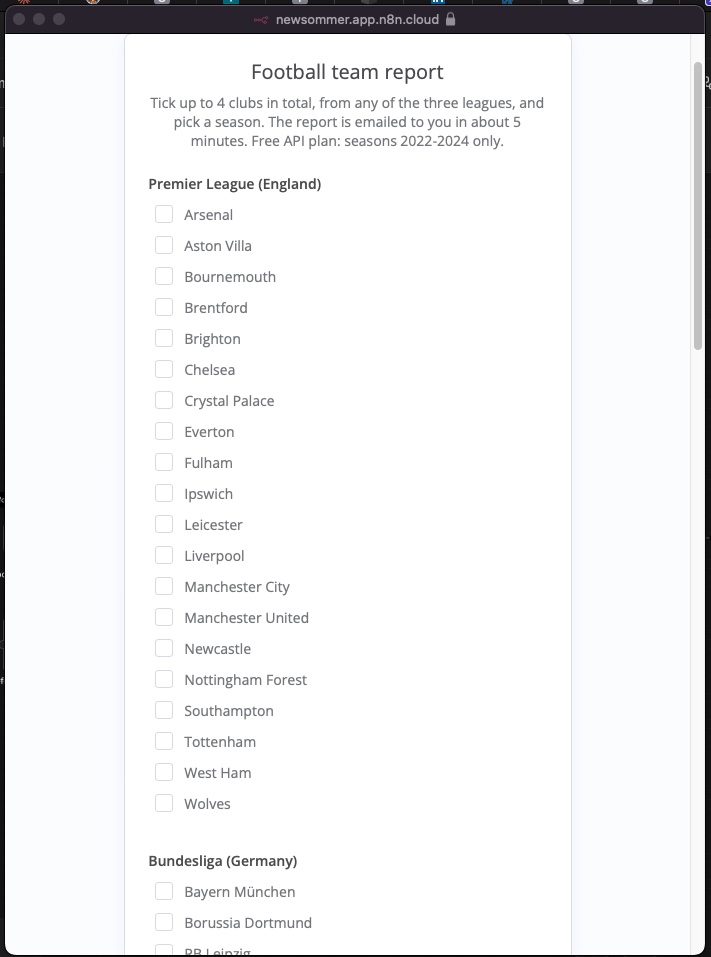
The generated form turns the current team table into a straightforward club selector; the same page also includes the MLS teams further down.
The selection step is small, but it made the workflow feel like a usable tool rather than a one-off automation. I could change the teams without editing the workflow, and rebuilding the league list each season would account for promotion and relegation.
From there, the workflow used the API credential to retrieve the relevant team data, performed some basic analysis, created a comparison, and emailed the result to me. The email connection could reuse an authorized account, so I did not need to build a separate mail service or handle its authentication in custom code.
For this experiment, I used n8n's credential handling. n8n also supports more controlled approaches to secrets for production and enterprise use. If this had been sensitive or production work, I would have applied the appropriate secret-management, access, and rotation controls rather than treating a proof-of-concept setup as the finished security architecture.
One platform vs. multiple services
Microsoft has an incredibly capable ecosystem, but an end-to-end automation solution can involve several products. Depending on the requirements, I might use Power Automate or Logic Apps for workflows, Azure Functions for custom processing, Copilot Studio or Azure AI Foundry for AI capabilities, Azure Key Vault for secrets, and Azure Monitor or Application Insights for operations.
Each component is powerful. Each can also introduce another configuration, integration point, deployment concern, and potentially another licensing or consumption decision.
n8n takes a more unified approach:
| Capability | n8n | Microsoft ecosystem |
|---|---|---|
| Workflow automation | Visual workflow engine | Power Automate / Logic Apps |
| AI agents | AI workflow nodes | Copilot Studio / Azure AI Foundry |
| API integration | HTTP Request and integration nodes | Connectors / Logic Apps / API Management |
| Data processing | Data transformation and Code nodes | Power Automate / Logic Apps / Azure Functions |
| Credential handling | Encrypted credentials; external-secret options vary by plan | Platform connections / Azure Key Vault |
| Scheduling | Schedule Trigger | Power Automate / Logic Apps |
| Monitoring | Workflow execution history | Azure Monitor / Application Insights |
These are not always direct one-to-one equivalents. Microsoft's services often provide deeper specialization, especially in large enterprise environments. But when the goal is to develop an integration, automation, or AI-enabled process quickly, having so much functionality accessible through one interface is appealing.
AI can be part of the workflow, not a separate project
This is probably the aspect of n8n that interests me most.
I often think of automation and AI as separate layers. An application collects and processes information, then passes the results to an AI service for interpretation. With n8n, those capabilities can be parts of the same visible workflow.
The football report could, for example:
- Retrieve the latest results and team statistics.
- Calculate changes in performance using defined, repeatable rules.
- Compare the results with prior statistics.
- Pass that structured information to an AI model.
- Generate a written explanation of the trends.
- Deliver the report on a weekly schedule.
The statistical calculations should remain deterministic and verifiable. AI can explain a result, but it should not be asked to invent the underlying numbers. The quality of its analysis still depends on the data, context, and instructions it receives.
That combination applies well beyond football. The same pattern could support operational reporting, security monitoring, customer-service workflows, financial analysis, or automated business intelligence.
Could n8n replace some Azure Functions?
Over the years, I have developed Azure Functions that authenticate with an external API, retrieve JSON, transform selected fields, write the result somewhere, and trigger another process. These are exactly the kinds of tasks n8n can coordinate through workflow nodes.
So why write and deploy a custom function when a visual workflow can accomplish the same thing?
There are certainly situations where Azure Functions remain the better choice. Complex application logic, high-throughput or low-latency workloads, specialized dependencies, detailed testing requirements, and computationally intensive processing can justify dedicated code.
But for straightforward API orchestration and data transformation, I can see n8n replacing some custom integration code. That can mean fewer deployments, less infrastructure to maintain, and a faster route from requirement to a working process. It can also make the integration logic more accessible to technical team members who do not know the original programming language.
Where Microsoft still has the advantage
I do not see n8n as a complete replacement for the Microsoft ecosystem. Microsoft has invested heavily in enterprise identity, governance, security, integration, and operational management. For organizations already committed to Microsoft 365 and Azure, that existing platform has substantial advantages:
- Enterprise identity and security: Microsoft Entra ID, managed identities, and established access-control models.
- Governance and compliance: Mature administration, auditing, and policy capabilities.
- Microsoft 365 integration: Deep connections with Teams, SharePoint, Outlook, Dynamics, and other business applications.
- Scalability: Azure services built for demanding production workloads.
- Monitoring: Application Insights, Log Analytics, and Azure Monitor provide extensive operational visibility.
n8n also offers security, governance, and enterprise-management capabilities, although availability depends on the deployment model and plan.
For me, the question is not simply which platform is better. It is: which platform introduces the least complexity while still meeting the technical and business requirements?
A hybrid architecture may be the practical answer
Given my background in Azure development and cloud operations, I can see a hybrid architecture working particularly well.
n8n Cloud — orchestration and automation
- API integrations
- Workflow management
- Data transformation
- AI orchestration
- Scheduling and event-driven processes
Microsoft Azure — infrastructure and data services
- Azure SQL for structured and historical data
- Azure Key Vault for centralized secrets management
- Azure Functions for specialized processing
- Application hosting
- Enterprise identity and security
Power BI — advanced analytics and visualization
- Interactive dashboards
- Historical reporting
- Data modeling and visualization
- Business-performance analysis
In this model, n8n becomes the orchestration layer connecting the services. Azure continues to provide scalable infrastructure, data, and security where they are needed. Power BI provides a richer analytical environment when the simple emailed comparison grows into something more substantial.
Are we overengineering automation?
A relatively simple requirement can quickly turn into a collection of services, integrations, deployment pipelines, monitoring configurations, and security dependencies. Sometimes that complexity is justified. Sometimes it is not.
What I appreciate about n8n is that it encourages me to think about the workflow first. What information do I need? Where does it come from? What processing is required? What decisions need to be made? Where should the result go?
The visual environment makes that process remarkably straightforward. It also gives product managers, business analysts, and developers something concrete to discuss together instead of relying entirely on technical documentation to explain how everything connects.
Final thoughts
I am still early in my exploration of n8n, and I have not tested every aspect of its capabilities. My first impression is nevertheless very positive.
I do not believe n8n automatically replaces Copilot Studio, Power Automate, Azure Functions, or the broader Azure ecosystem. What it offers is a compelling way to bring many of those capabilities together into one cohesive development experience.
The football analytics proof of concept did what I wanted it to do: maintain a current choice of teams across three leagues, let me select Portland Timbers, Liverpool, and Bayer Leverkusen, retrieve their data, produce a comparison, and deliver it by email. I reached that outcome without creating an application or database and without turning a fun experiment into an infrastructure project.
For rapid prototypes, API integrations, workflow automation, and AI-assisted processes, that simplicity has real value.
Sometimes innovation is not about introducing another technology. Sometimes it is about making the technologies we already have easier to work with.