As a Product Manager, I need more from a project board than a collection of cards moving from To Do to Done. I need a place where ideas can become a structured backlog, where work can be prioritised, estimated and broken down, and where there is clear traceability between what we want to build and what the engineering team actually builds.
I use GitHub Projects in my own projects. I also like Jira, Trello, and Azure DevOps, and each has strengths depending on the team and the type of work being managed. What I particularly like about GitHub Projects, however, is its closeness to the code and to GitHub Issues. The backlog does not have to live in a project-management system that is separated from the engineering work: issues, branches, commits, pull requests and project items can all live close together.
Two examples are NSO Security and Coach Ben. Both products use backlogs and prioritisation to improve the dialogue between what we want to build and how we build it. That distinction matters. A backlog should not simply be a list of development tasks; it should help Product Management communicate intent, priority and value while giving engineering a clear path from requirement to implementation.
So how well does GitHub Projects work as a Product Management tool, and how does it compare with some of the alternatives?
For this comparison, I am looking at GitHub Projects, Jira, Azure DevOps Boards, GitLab, Linear and Trello. Rather than judging them simply as Kanban boards, I am comparing the capabilities I want when managing software and data-product backlogs.
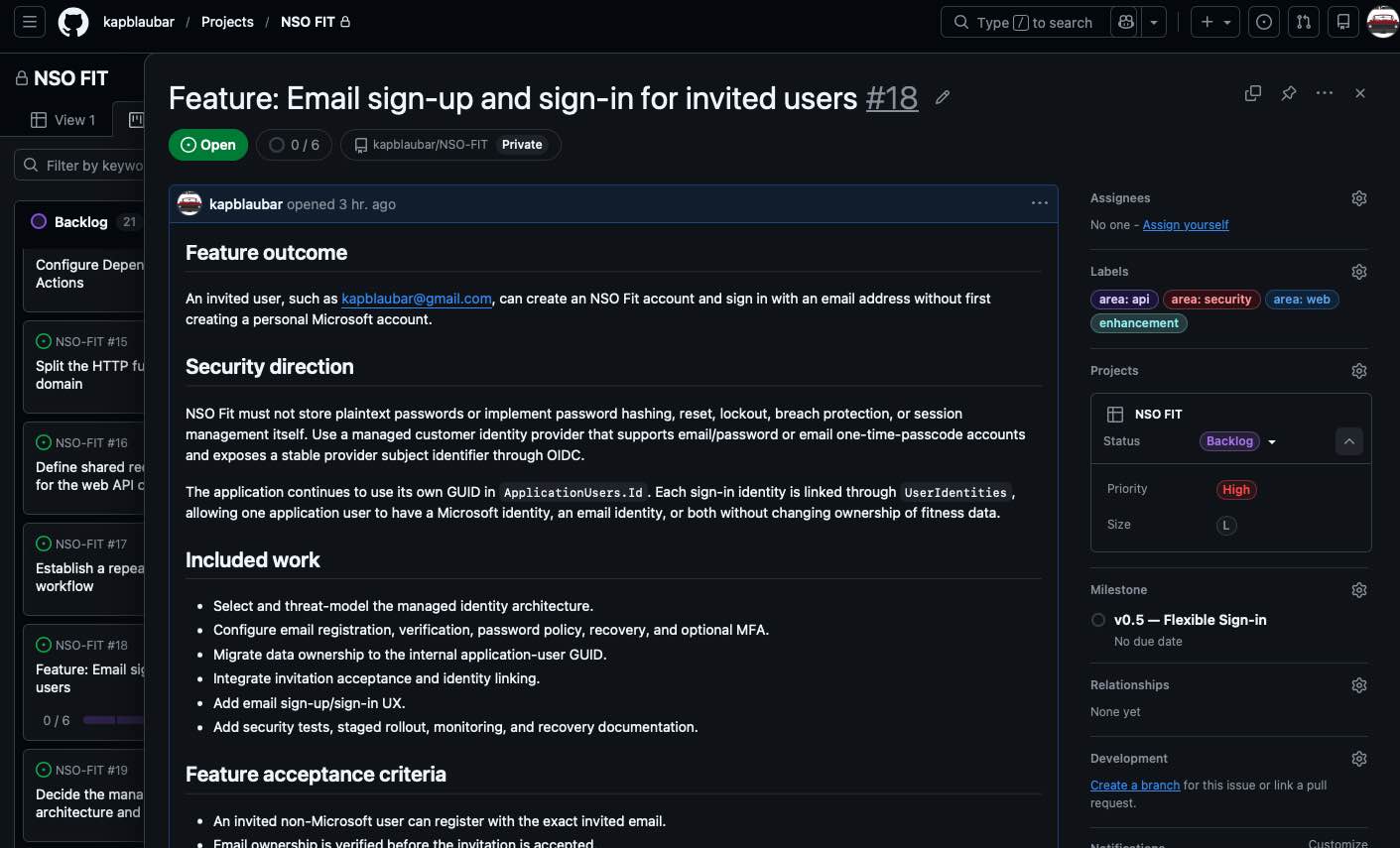
A feature in the NSO FIT project. The issue describes the product outcome while the project fields keep its delivery context visible.
Comparison
My assessment, September 2026: ★★★ = strong/native capability · ★★ = supported, but may require configuration or have limitations · ★ = weak, add-on or workaround
| Requirement | GitHub Projects | Jira | Azure DevOps | GitLab | Linear | Trello |
|---|---|---|---|---|---|---|
| Backlog management | ★★★ | ★★★ | ★★★ | ★★★ | ★★★ | ★★ |
| Prioritisation | ★★★ | ★★★ | ★★★ | ★★★ | ★★★ | ★★ |
| Parent/child hierarchy | ★★★ | ★★★ | ★★★ | ★★★ | ★★★ | ★ |
| Labels / categorisation | ★★★ | ★★★ | ★★★ | ★★★ | ★★★ | ★★★ |
| Effort estimation | ★★★ | ★★★ | ★★★ | ★★★ | ★★★ | ★★ |
| Actual time tracking | ★ | ★★★ | ★★★ | ★★★ | ★ | ★★ |
| Notifications | ★★ | ★★★ | ★★★ | ★★★ | ★★ | ★★★ |
| Code / change traceability | ★★★ | ★★★ | ★★★ | ★★★ | ★★★ | ★ |
| Data / database change traceability | ★★ | ★★ | ★★★ | ★★ | ★★ | ★ |
| Dependencies | ★★★ | ★★★ | ★★★ | ★★★ | ★★★ | ★★ |
| Sprint / iteration support | ★★★ | ★★★ | ★★★ | ★★★ | ★★★ | ★★ |
| Kanban / workflow management | ★★★ | ★★★ | ★★★ | ★★★ | ★★★ | ★★★ |
| WIP management | ★★ | ★★★ | ★★★ | ★★★ | ★★ | ★★ |
| Roadmaps / timelines | ★★★ | ★★★ | ★★★ | ★★★ | ★★★ | ★★ |
| Agile reporting | ★★ | ★★★ | ★★★ | ★★★ | ★★★ | ★★ |
| Custom fields | ★★★ | ★★★ | ★★★ | ★★★ | ★★ | ★★★ |
| Workflow automation | ★★★ | ★★★ | ★★★ | ★★★ | ★★★ | ★★★ |
| Multiple repositories / codebases | ★★★ | ★★★ | ★★★ | ★★★ | ★★★ | ★ |
| Release / deployment traceability | ★★ | ★★★ | ★★★ | ★★★ | ★★ | ★ |
| BI / external analytics integration | ★★ | ★★★ | ★★★ | ★★★ | ★★ | ★★ |
| Ease of use for Product Managers | ★★★ | ★★ | ★★ | ★★ | ★★★ | ★★★ |
These ratings are my assessment from a Product Management perspective, not a claim that every feature is available on every subscription tier. Capabilities change and may vary by product edition, configuration and integrations.
The table is a conversation starter, not a universal league table. A three-star capability can still be the wrong fit if it creates too much administration for the team, while a two-star capability may be entirely sufficient when a lightweight process is the goal.
What Do These Requirements Mean?
1. Backlog Management
A Product Manager needs a central place to capture proposed features, user stories, defects, technical debt, data work and other requirements. The backlog should remain manageable as the product grows rather than becoming an unstructured list of tasks.
2. Prioritisation
Not everything can or should be built at once. Individual issues or user stories need to be ranked or assigned priorities so that Product Management can communicate which work provides the greatest value or urgency.
3. Parent/Child Hierarchy
Larger requirements need to be decomposed into smaller pieces of deliverable work. A useful hierarchy allows relationships such as Epic → Feature → User Story → Task, while still letting the Product Manager see progress at the higher level.
4. Labels and Categorisation
Labels provide a flexible way of classifying work by areas such as product, component, defect, technical debt, security, data or customer. Good categorisation makes a large backlog easier to search, filter, report on and discuss.
5. Effort Estimation
The team needs a mechanism for estimating the relative or absolute effort required to complete work. Depending on the team's Agile approach, this might be story points, T-shirt sizes, hours or another estimation method.
6. Actual Time Tracking
Estimation tells us what we thought the work would require; actual time helps us understand what happened. Native time tracking is particularly useful where teams need estimate-versus-actual analysis, capacity information, billing or detailed effort reporting.
GitHub Projects is weaker here natively, although an Actual Hours custom field, GitHub automation, an integration, or external reporting can be used to fill the gap.
7. Notifications
Changes to important backlog items should reach the people who need to know about them. Notifications may include assignment changes, comments, status changes, new dependencies, completed work or other significant updates.
8. Code and Change Traceability
For a software product, a requirement should ideally be traceable into the engineering work that implements it. Linking issues and stories to branches, commits and pull requests makes it possible to move from why are we doing this? to what code changed because of it?
This is one of the areas where GitHub Projects is particularly attractive to me because the backlog and engineering workflow are so close together.
9. Data and Database Change Traceability
Data products introduce another type of engineering change: SQL, schemas, pipelines, notebooks, semantic models and reporting assets. Ideally, a Product Manager should be able to trace a requirement through these changes just as easily as a traditional application feature.
10. Dependencies
Product work rarely exists in isolation. The tool should make it clear when one story is blocked by, depends on, or must be completed before another piece of work.
11. Sprint and Iteration Support
Teams using Scrum or time-boxed delivery need to assign work to iterations or sprints. This allows Product Management and engineering to distinguish the overall backlog from the work currently committed for delivery.
12. Kanban and Workflow Management
A Kanban board should make the state of work immediately visible as it moves through the team's workflow. More importantly, the workflow should represent how the team actually delivers work rather than forcing every team into the same To Do → Doing → Done process.
13. Work-in-Progress Management
Kanban is not simply about displaying cards in columns; limiting work in progress is an important part of managing flow. WIP controls help prevent teams from starting more work than they can effectively finish.
14. Roadmaps and Timelines
Product Managers need to look beyond the current sprint. Roadmap and timeline views help communicate when larger initiatives, features or releases are expected and how work relates over a longer period.
15. Agile Reporting
Boards tell us where work is now; reporting tells us how the delivery system is performing. Useful measures can include velocity, throughput, burndown, cycle time, lead time and cumulative flow.
16. Custom Fields
Every product has information that matters specifically to that team. Custom fields allow the backlog to capture values such as Business Value, Risk, Customer, Target Release, Story Points, Estimate Hours or Actual Hours without forcing everything into labels.
17. Workflow Automation
Routine administration should not consume Product Management or engineering time. Automation can assign work, update fields, move issues between states, add items to projects or trigger actions when defined events occur.
18. Multiple Repositories and Codebases
A product does not necessarily equal one repository. A single product backlog may need to coordinate a web application, API, mobile app, infrastructure-as-code repository, database repository and data pipelines while maintaining a unified product view.
19. Release and Deployment Traceability
Completing development is not the same as delivering value to a user. Ideally, the Product Manager should be able to follow a requirement through development and into a release or production deployment. GitHub's deployment history connects deployments to commits, branches, workflow logs and source pull requests, but complete traceability back to the original product requirement still depends on consistent issue and pull-request linking.
20. BI and External Analytics Integration
The project-management tool should not become a reporting silo. Being able to extract backlog, sprint, issue, effort and delivery data into platforms such as Power BI enables teams to build product and delivery analytics that go beyond the reports supplied by the project tool itself.
Azure DevOps is particularly strong here because of its established analytics capabilities and Power BI integration. GitHub data can also be extracted through the Projects API and project-data exports, which means a team can build its own Power BI or Fabric model around the product backlog and engineering activity. That is powerful, but it is a custom integration rather than an equivalent native Power BI experience.
This opens the door to dashboards covering measures such as velocity, estimate accuracy, cycle time, throughput, planned versus unplanned work, defects, technical debt, work by Epic, and delivery trends.
21. Ease of Use for Product Managers
Capability only matters if people actually use it. A Product Management tool should make backlog refinement, prioritisation, planning and stakeholder discussions straightforward without requiring excessive administration just to keep the system working.
More Than a Kanban Board
This is an important distinction when comparing these products.
Almost any modern project-management application can display cards in columns. That does not necessarily make it a strong Agile Product Management platform.
For me, the more useful question is whether the tool can support the complete conversation:
Idea → Requirement → Prioritised Backlog → Parent/Child Structure → Estimate → Sprint → Engineering Change → Pull Request / Data Change → Deployment → Measurement
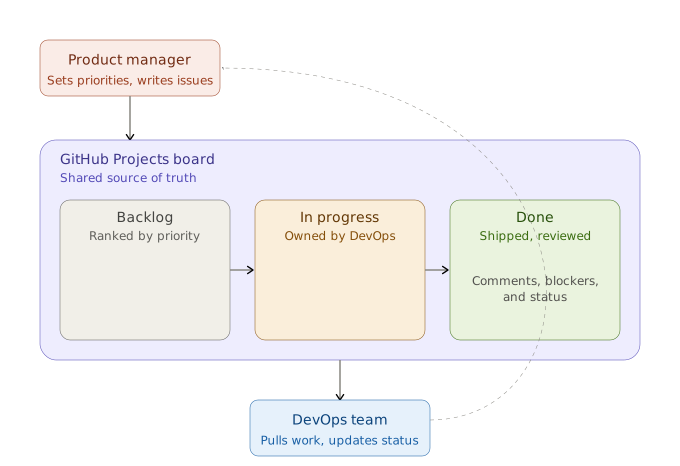
The board is most useful as a shared source of truth: Product Management sets direction, engineering pulls and updates work, and delivery feedback informs the next decision.
That is where GitHub Projects becomes particularly interesting.
Its biggest advantage is not that it has a good Kanban board. Its advantage is that the Product Management conversation can sit extremely close to the engineering work that turns those requirements into a working product.
Its weaknesses should not be ignored. Native actual-time tracking, some Agile reporting and certain enterprise planning capabilities are stronger in tools such as Jira and Azure DevOps. But GitHub Projects has evolved into something much more capable than a simple issue board.
For teams already building their products in GitHub, that raises an interesting question:
Do we really need to move the product backlog somewhere else?
My conclusion
GitHub Projects is not the automatic winner for every organisation. Jira and Azure DevOps remain compelling when detailed time tracking, mature Agile reporting, or heavily governed enterprise planning is central to the way the organisation works. Trello can be a better choice when simplicity matters more than engineering traceability, while Linear and GitLab each make a strong case for teams already comfortable in their respective ecosystems.
But for a software product whose engineering work already lives in GitHub, I would start by asking what is genuinely missing before introducing a separate backlog platform. GitHub Projects can hold the product view—outcomes, priorities, hierarchy, iterations, dependencies, and roadmap—while GitHub Issues, pull requests, and deployments carry that intent into implementation.
The deciding factor is not the number of features in the tool. It is whether Product Management and engineering can use the same system to have a clearer conversation, make better trade-offs, and follow an idea all the way to a customer outcome.